Key takeaways
- The Money Calendar puts income, bills and a projected balance on every day of the month.
- The lowest projected balance of the month is the number worth watching.
- The next 30 days list shows what's coming in order, across the end of the month.
- The Money Calendar is free on every plan.
A monthly budget tells you whether your income covers your spending over the month. It doesn’t tell you whether the money arrives in time. Rent can be fully budgeted and still land two days before your paycheck. The Money Calendar is where Aurelo shows you timing: your whole month laid out day by day, with what comes in, what goes out, and where your balance is heading.
This guide covers what the calendar shows, how to read the projected balances, and how to use it to find the tight day before it finds you.
What the Money Calendar shows
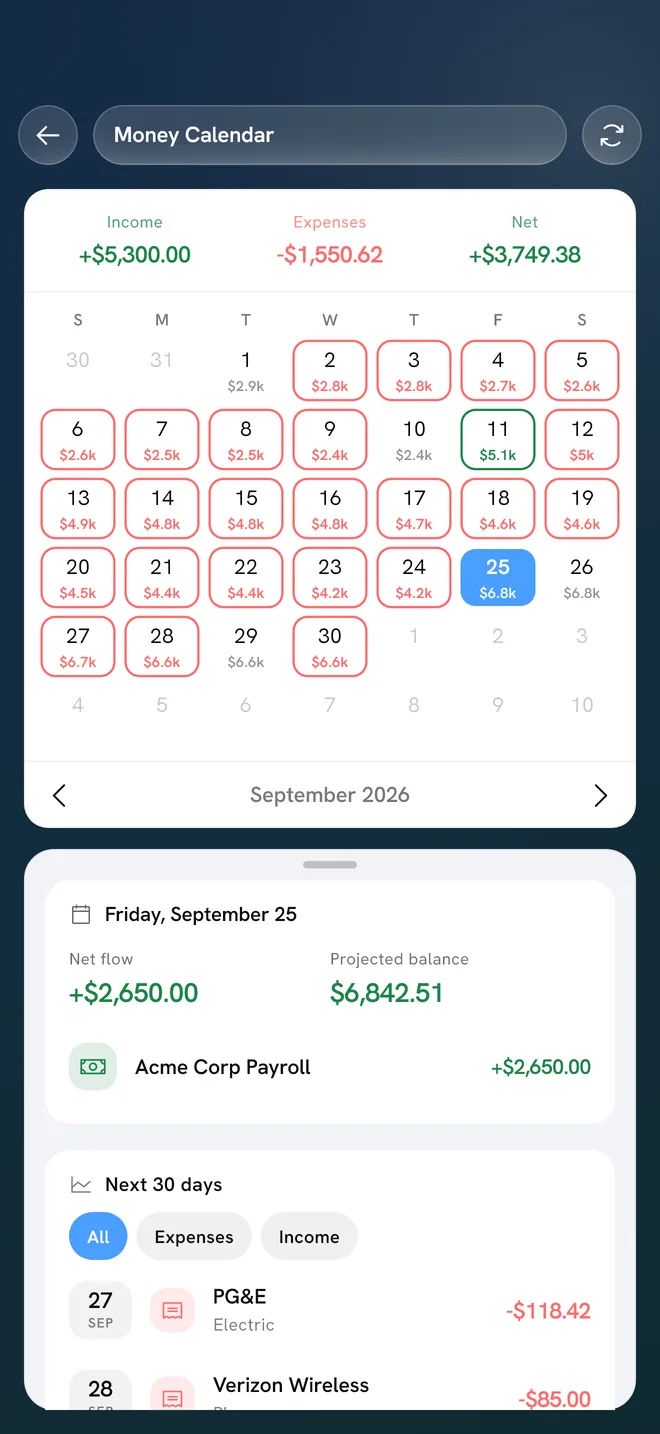
The Money Calendar puts your month on a familiar calendar grid. For each day, it shows:
- Income: your paydays and other money coming in.
- Bills: what’s due that day.
- Projected balance: where your balance is expected to be that day, once the income and bills before it are counted.
Above or alongside the grid, you’ll see the month’s totals for Income, Expenses and Net, so you can tell at a glance whether the month comes out ahead.
Tap a day to select it and see what’s on it. Below the grid, a Next 30 days list shows what’s coming in order, which is useful near the end of a month when the next paycheck and the next rent payment fall on the other side of the page.
Where the bills come from
The bills on your calendar are the same recurring bills Aurelo shows elsewhere in the app. Aurelo detects them from your transactions and shows what’s due and when, and it only shows a bill it’s confident about. It won’t guess.
That’s worth remembering when you read the calendar. If a bill is new or unusual, it may not be on the calendar yet. If you know something is due that isn’t shown, keep it in mind when you read the projected balance for that week.
Reading projected balances
The projected balance is the most useful number on the calendar, and the easiest to misread. It’s not what’s in your bank today. It’s where your balance is expected to be on that day, based on the income and bills scheduled before it.
A few habits make it easier to read:
- Follow the line, not a single day. Scroll through the month and notice how the balance rises on paydays and steps down on bill days. The shape tells you more than any one number.
- Read it as a forecast, not spending money. A projected balance of $600 on the 20th doesn’t mean $600 is free to spend. Your pockets for groceries, gas and the rest still need their share, and a bill Aurelo hasn’t detected yet won’t be in the projection.
- Compare it with your pockets. Your budget already sets aside money for groceries, eating out and the rest. The calendar tells you whether the timing of your bills leaves room for that spending on each day.
A worked example
Here’s an example. Say you’re paid $2,100 on the 1st and the 15th, and you start the month with $400 in checking.
| Date (example) | What happens | Projected balance |
|---|---|---|
| 1st | Paycheck +$2,100, rent −$1,500 | $1,000 |
| 5th | Car loan −$320 | $680 |
| 10th | Phone −$70, internet −$60 | $550 |
| 14th | Electricity −$130, card payment −$450 | −$30 |
| 15th | Paycheck +$2,100 | $2,070 |
On paper, this month is fine: $4,200 comes in and far less goes out in bills. But the 14th projects below zero, the day before payday, even before you count groceries or gas. The monthly total hides it; the calendar makes it obvious.
Spotting the tight day
Most months have one day where the projected balance bottoms out. It’s usually the day before payday, or right after several large bills land close together. That’s the tight day, and knowing it in advance changes what you can do about it.
When you spot one, you have options:
- Hold back a little in the days before it. If the 14th is tight, a lighter week of spending from the 8th to the 14th may be enough.
- Move a bill. Many companies let you change a due date if you ask. Moving the card payment from the 14th to the 16th in the example solves the problem entirely. How to Organize Your Bills walks through lining due dates up with paydays.
- Keep a cushion. A small amount left in checking after each payday absorbs tight days without a scramble. Over time, that’s what an emergency fund does on a larger scale.
- Reshuffle. If a pocket needs more than you planned, move money from another pocket rather than dipping into what’s set aside for bills.
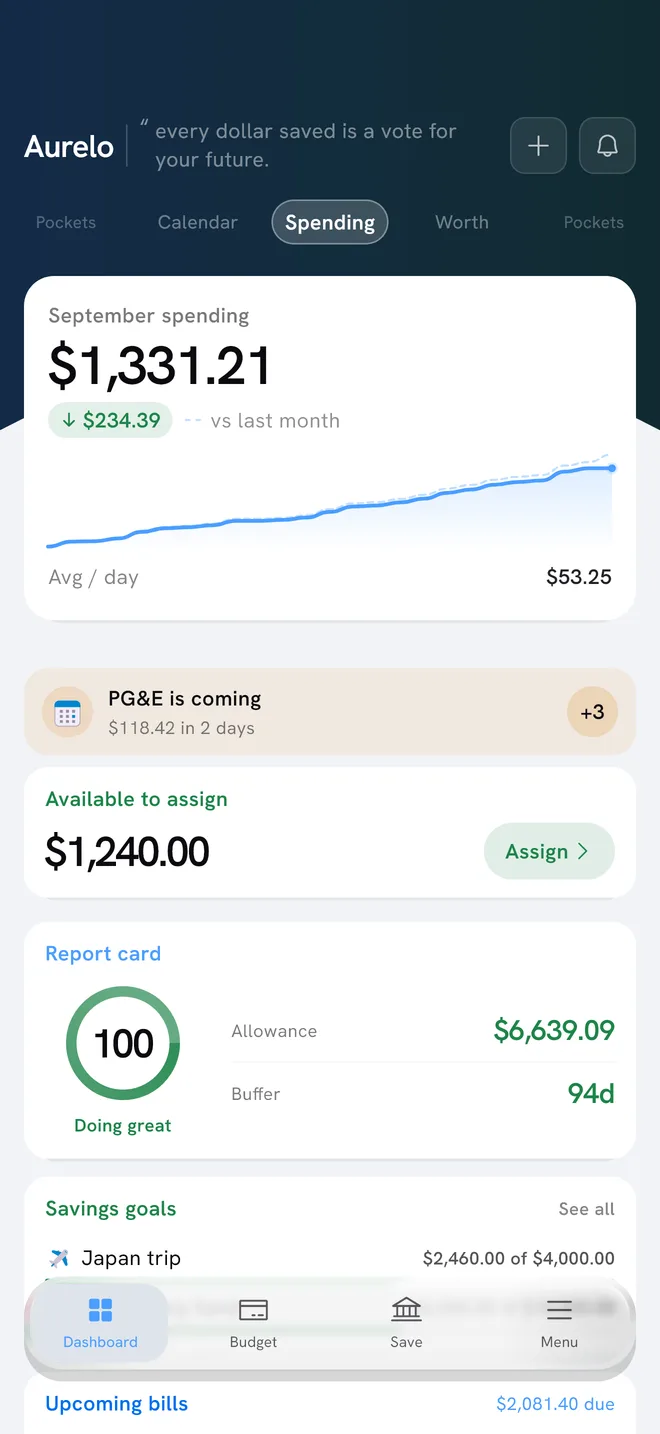
In Aurelo: Today’s Allowance on the Dashboard already subtracts the bills due before your next payday, and Buffer Days shows how long your cash would last at your recent spending. The calendar adds the day-by-day view, so you can see exactly when things get tight.
Using the calendar with the rest of your budget
The Money Calendar works best as a quick weekly check alongside your budget:
- Once a week, open the calendar and scan the next 30 days. Look for the lowest projected balance and the day it falls on.
- Check that your pockets for bills are funded before those bills arrive. Smart Fill helps here: when it proposes amounts through your next payday, it covers the bills due before then first.
- Glance at the month’s Net. If Expenses outpace Income, look at which bills or pockets are driving it.
If you’re paid every two weeks, the calendar is particularly handy in months with a third paycheck, and when bills fall between checks. Budgeting on a biweekly paycheck covers that pattern in more depth.
Free on every plan
The Money Calendar is included on every plan, including Free. You don’t need Gold to see your month laid out day by day.
One thing it doesn’t do: Aurelo never moves money, so the calendar doesn’t pay your bills. It shows what’s due and when; you pay the way you already do, through your bank or the company. If you use autopay, the calendar is a good way to make sure the money is there on the day it runs.
In Aurelo: New to the app? Getting Started With Aurelo walks through building your budget, and What Today’s Allowance and Buffer Days Tell You explains the two numbers that pair with the calendar.
Common questions
What is a money calendar?
A money calendar puts your paydays and bills on the dates they happen, alongside the balance you can expect each day. It shows timing, which a monthly budget total can't: whether the money for a bill arrives before the bill does.
How do I know which day of the month my money is tightest?
Look for the day with the lowest projected balance. It's usually just before payday, or right after a cluster of large bills. Knowing that day in advance lets you hold back spending or move a bill.
Is Aurelo's Money Calendar a paid feature?
No. The Money Calendar is included on every plan, including Free.
Does the Money Calendar pay my bills?
No. Aurelo never moves money. The calendar shows what's due and when; you pay bills the way you do now, through your bank or the company.
Written by the Aurelo team. We build Aurelo, a budgeting app that reads your accounts read-only and never moves your money. Every claim about the app is checked against the app itself. This is general education, not financial, tax or legal advice.